
In this detailed Blue Yeti review, we examine a multi-pattern USB condenser microphone built for podcasters, streamers, voiceover artists, and remote professionals who need flexible recording options without purchasing an external audio interface. Its standout feature is an internal tri-capsule array that allows hardware switching between four polar patterns: cardioid, omnidirectional, bidirectional, and stereo.
Updated October 2026: The Yeti’s job has not changed: it is the plug-and-play USB mic for creators who want to record today, with no interface, no phantom power, and no extra gear to buy. That simplicity is also its ceiling - it cannot grow into an XLR setup later. This update adds the disclosure this article was missing, plus a straight answer on the one question every buyer should settle first: will you stay USB, or are you heading toward XLR?
Disclosure: This article contains affiliate links. If you buy through them, HeadphoneEcho may earn a small commission at no extra cost to you. Recommendations are based on research and published specifications, not on commissions.
However, its high acoustic sensitivity means it readily captures keyboard clatter, computer fans, and room reflections in untreated environments. For content creators working in moderate-to-quiet rooms who want plug-and-play simplicity and multi-person recording capability on a single desktop device, the Yeti remains a practical, well-built contender.
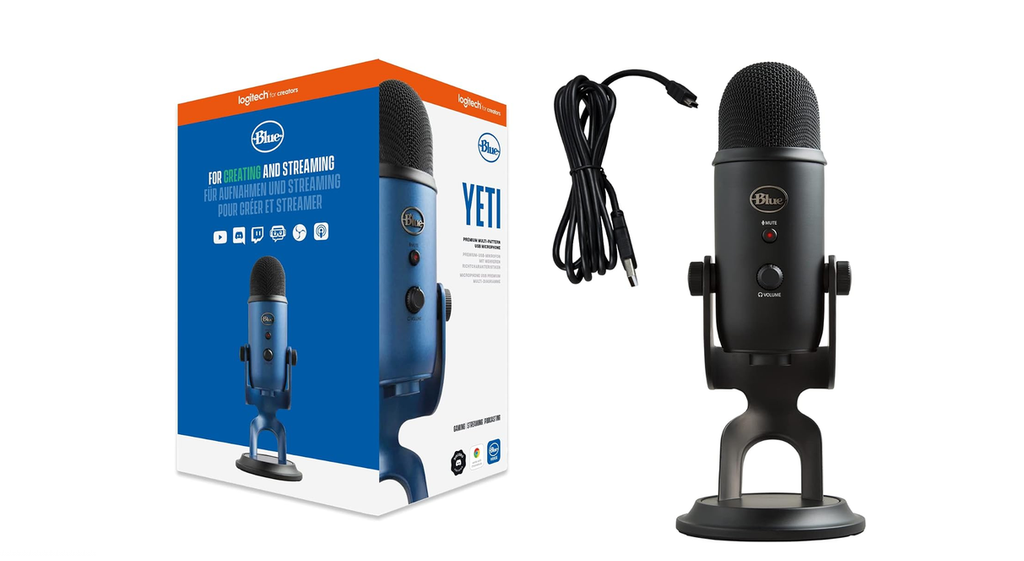
At a Glance
| Specification | Details |
| Capsule Type | Proprietary tri-capsule array (three 14mm condenser capsules) |
| Polar Patterns | Cardioid, Bidirectional (Figure-8), Omnidirectional, Stereo |
| Frequency Response | 20 Hz to 20 kHz |
| Sample Rate / Bit Depth | 48 kHz / 16-bit |
| Maximum SPL | 120 dB (THD: 0.5% at 1 kHz) |
| Headphone Amplifier | 16 ohms impedance, 130 mW power output, 0.009% THD |
| Connectivity | USB (Mini-USB or USB-C depending on production release), 3.5mm headphone out |
| Dimensions on Stand | 4.72 x 4.92 x 11.61 inches (12 x 12.5 x 29.5 cm) |
| Weight | Microphone: 1.2 lbs (0.55 kg); Base Stand: 2.2 lbs (1.0 kg); Total: 3.4 lbs (1.55 kg) |
| Mounting Compatibility | Standard 5/8-inch threading (or 3/8-inch via standard adapter) |
| Software Compatibility | Logitech G HUB / Blue VO!CE on Windows and macOS |
Who Should Buy It?
- Multi-person podcasters on a budget: Creators recording two people sitting across a table (using bidirectional mode) or a small roundtable discussion (using omnidirectional mode) with a single microphone.
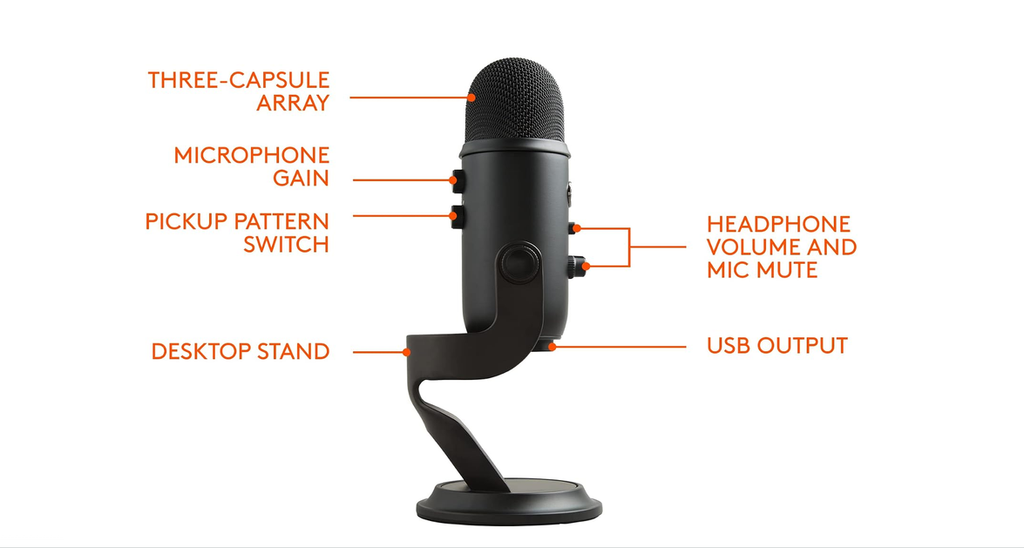
- Streamers wanting direct hardware controls: Users who prefer physical dials for instant microphone gain adjustments, headphone volume, mute status, and polar pattern switching without opening software menus.
- ASMR and sample creators: Entry-level producers who want to record true stereo spatial audio without investing in two separate matched XLR microphones and a multi-channel mixer.
Who Should Skip It?
- Users in noisy or echo-prone rooms: The Yeti uses sensitive condenser capsules that pick up mechanical keyboard clicks, desk vibrations, and background reverberation. A dynamic USB microphone such as the Shure MV7+ or Samson Q2U rejects ambient noise far more effectively.
- Frequent travelers and mobile creators: Weighing 3.4 pounds with its desktop stand and occupying significant desk space, the Yeti is bulky compared to compact travel microphones like the Rode NT-USB Mini.
- Producers requiring 24-bit studio headroom: The standard Yeti records at a maximum resolution of 16-bit / 48 kHz. While sufficient for podcasting, streaming, and conferencing, it offers less dynamic range for heavy post-production processing than 24-bit / 96 kHz competitors.
Evaluation Methodology
This evaluation is based on manufacturer documentation, published acoustic specifications, physical teardowns, independent bench tests, and technical analysis of USB condenser microphone architecture. We analyzed capsule placement, polar pattern performance, polar response consistency, noise-floor handling, chassis resonance, and software integration across both Windows and macOS platforms.
Design and Build Quality
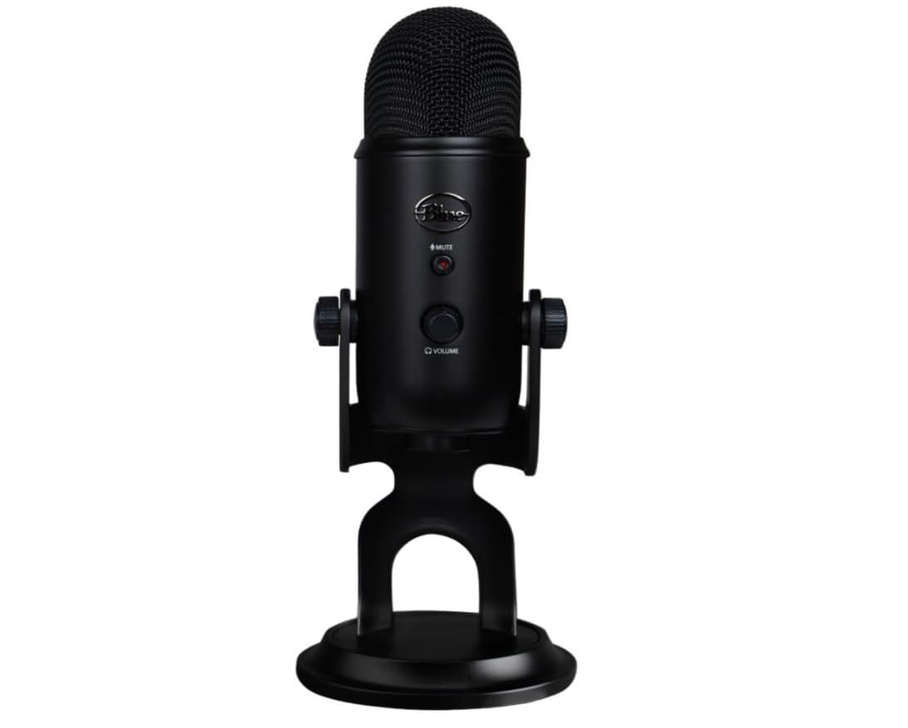
The Blue Yeti features an all-metal cylindrical chassis mounted to a heavy cast-metal base stand. At 3.4 pounds fully assembled, the unit is exceptionally stable on a desk and will not slide during adjustments. Rubber padding on the bottom of the base helps dampen basic surface resonance, though direct table impacts will still travel into the capsule.
The microphone pivots on two side thumbscrews, allowing users to angle the unit toward their mouth. Because the Yeti is a side-address microphone, the top of the capsule should point toward the ceiling while the front logo faces the speaker.
One structural drawback is cable clearance. The bottom-mounted USB and 3.5mm headphone ports sit close to the metal base, requiring cables to bend sharply when the microphone is tilted upright.
Setup and Hardware Controls
The Yeti operates over standard USB bus power with plug-and-play functionality. It requires no specialized drivers to function across Windows, macOS, or ChromeOS.
The inclusion of an analog gain dial on the microphone body makes it simple to manage clipping during live streams, though the knob lacks numerical markings or detents for repeatable level matching.
Audio Performance and Capsule Architecture
At the core of the Yeti is a proprietary array of three 14mm electret condenser capsules. By combining and phase-aligning the signals from these capsules, the microphone creates four distinct pickup patterns.
1. Cardioid Pattern
Cardioid captures sound directly in front of the capsule while attenuating audio from the rear. The frequency profile features a slight low-end rise within four inches (proximity effect) and an upper-midrange presence lift between 4 kHz and 10 kHz. This profile delivers crisp speech articulation for solo podcasts, voice calls, and streaming. Off-axis rejection at 180 degrees is solid, though side reflections in unpadded rooms will still be captured.
2. Bidirectional (Figure-8) Pattern
Bidirectional mode activates the front and rear diaphragms while canceling out sound arriving from the left and right sides. This mode is useful for two-person interviews across a small table, saving the cost of a dual-mic setup while maintaining separation from side room noise.
3. Omnidirectional Pattern
This setting captures sound equally from all 360-degree angles around the microphone. It works well for group conference tables or multi-person discussions, but it also captures every ambient reflection, HVAC unit, and room echo in the space.
4. Stereo Pattern
Stereo mode uses two capsules to split left and right acoustic channels. This mode provides realistic spatial separation for acoustic instruments, ambient field recording, and ASMR content where left-to-right positional tracking is necessary.
Key Features in Practice
Zero-Latency Headphone Monitoring
The onboard 3.5mm output routes microphone audio directly to your headphones alongside computer playback without digital latency. The internal amplifier produces 130 mW into 16 ohms, providing clean, distortion-free output for common studio monitor headphones.
Logitech G HUB and Blue VO!CE Integration
When connected to modern computers, the Yeti integrates with Logitech G HUB software to access Blue VO!CE digital signal processing. This software package provides a high-pass filter, noise reduction, a de-esser, a compressor, and an equalizer. While these software tools improve vocal tone and suppress light background noise, they run on the computer CPU rather than an onboard digital signal processor (DSP).
Desk Resonance and Isolation
Because condenser diaphragms are lightweight and sensitive, the Yeti picks up mechanical vibrations transmitted through desks. Typing on a keyboard or bumping the table produces a low-frequency rumble in the recording. Placing the microphone on a boom arm or using an elastic shock mount (such as the Blue Radius III) significantly improves signal cleanliness.
Strengths and Limitations
What We Like
- Four switchable polar patterns: Instant hardware switching allows solo voice, two-person interviews, and group recordings on a single device.
- Comprehensive hardware control: Direct access to gain, mute status, headphone volume, and pattern selection on the microphone body.
- Durable all-metal build: Heavyweight desk base and metal casing provide long-term physical durability.
- Low-latency monitoring: Integrated 3.5mm output allows real-time vocal monitoring without software delay.
- Broad platform compatibility: True plug-and-play operation across major desktop operating systems.
What We Don’t Like
- High room-noise pickup: Sensitive condenser design easily records computer fans, room reverberation, and keyboard clicks in untreated rooms.
- Heavy, bulky footprint: Weighing 3.4 pounds, it requires a sturdy, high-tension boom arm if mounted off the desk.
- 16-bit / 48 kHz recording ceiling: Limited dynamic range compared to modern 24-bit / 96 kHz competitors.
- No internal high-pass filter: Requires software-level filtering to eliminate low-end desk rumble and HVAC hum.
Competitor Comparison
| Model | Capsule Type | Polar Patterns | Max Bit / Sample Rate | Direct Hardware Controls | Best Use Case |
| Blue Yeti | Condenser (Tri-capsule) | Cardioid, Omni, Bi-dir, Stereo | 16-bit / 48 kHz | Gain, Mute, Volume, Pattern | Versatile setups & multi-person calls |
| Elgato Wave:3 | Condenser (Single capsule) | Cardioid only | 24-bit / 96 kHz | Multi-function dial, Mute | Streaming with advanced digital mixing |
| Audio-Technica AT2020USB-X | Condenser (Single capsule) | Cardioid only | 24-bit / 96 kHz | Mute, Headphone Mix / Volume | Solo voiceover & acoustic music |
| Shure MV7+ | Dynamic (Single capsule) | Cardioid only | 24-bit / 48 kHz (USB) / XLR | Touch panel, DSP via MOTIV | Untreated rooms & professional podcasting |
Blue Yeti vs. Elgato Wave:3
The Elgato Wave:3 is built specifically for solo streamers. It features a single cardioid capsule, 24-bit / 96 kHz conversion, and internal Clipguard technology that automatically prevents analog clipping. It also includes the Wave Link digital audio mixer for routing game, chat, and music channels. Choose the Wave:3 for solo streaming in an organized software workflow; choose the Yeti if you need hardware pattern switching for multi-person recordings.
Blue Yeti vs. Audio-Technica AT2020USB-X
The AT2020USB-X uses a studio-derived condenser capsule that delivers a smoother, more neutral high-frequency response than the Yeti. It is smaller, lighter, and supports 24-bit / 96 kHz recording. However, it only offers a cardioid pattern. If your priority is music tracking or solo voiceover fidelity, the AT2020USB-X provides superior acoustic transparency.
Blue Yeti vs. Shure MV7+
The Shure MV7+ uses a dynamic capsule rather than a condenser. Dynamic capsules require close proximity and provide significantly better passive rejection of room noise, HVAC hum, and keyboard clatter. The MV7+ also offers both USB-C and professional XLR outputs alongside onboard DSP processing. It costs more than the Yeti, but it is the superior choice for untreated rooms and dedicated podcast studios.
Compare Current USB Microphone Deals
Value for Money
The Blue Yeti sits in the mid-range USB microphone category.
What you pay for:
- An all-metal chassis with a stable desktop stand.
- A tri-capsule system providing four distinct pickup patterns.
- Zero-latency headphone monitoring with full analog controls on the device.
What you sacrifice:
- 24-bit studio audio resolution.
- Passive background noise rejection (compared to dynamic microphones).
- Compact portability.
For creators who need a single microphone to cover solo voiceovers, two-person interviews, and group calls, the Yeti delivers strong functional value because it replaces the need for multiple microphones or an audio interface. Solo creators working in untreated rooms will gain better vocal isolation by spending slightly more on a dynamic microphone.
2026 Check: Buy the Yeti Only If You Will Stay USB
The Yeti wins on day one. For solo podcasting, streaming, and voice work on a computer, USB is the whole point: plug it in, pick the cardioid pattern, and record. No interface to research, no gain-staging chain to learn, and nothing else to buy before the first episode. See our MacBook setup guide if you are pairing it with a Mac.
It loses the upgrade argument. If you already plan to move to an XLR microphone within a year - for a treated room, a better preamp, or a full studio chain - the Yeti’s price becomes a detour, not a saving. In that case the honest starting point is an XLR mic and interface from the beginning; our Blue Yeti vs AT2020 comparison and the AT2020 review lay out exactly what that chain costs and what it buys you.
The middle path: keep it as mic two. A Yeti does not become useless when you upgrade. Its bidirectional pattern makes it a genuinely useful second mic for two-person interviews and guest recordings - the exact job a single cardioid XLR mic cannot do alone. Buy it as your only mic, or buy it knowing it will become your interview mic; just do not buy it expecting it to become an XLR mic later.
Final Verdict and Score
The Blue Yeti remains a dependable, versatile USB microphone that delivers clear vocal quality and exceptional pattern flexibility. While newer competitors offer 24-bit audio processing and dedicated digital mixing suites, the Yeti’s durable hardware, physical controls, and multi-capsule array keep it relevant for creators who need flexibility on a budget.
Check Current Price & Availability
Frequently Asked Questions
Does the Blue Yeti require an audio interface or preamplifier?
No. The Blue Yeti is an all-in-one USB microphone containing its own internal analog-to-digital converter and preamplifier. It plugs directly into a standard USB port on a computer and draws power over the USB bus.
Is the Blue Yeti a side-address or top-address microphone?
The Blue Yeti is a side-address microphone. You speak into the side of the metal grille with the Blue logo facing your mouth, not directly into the top of the cylinder. Speaking into the top results in muffled audio and improper polar pickup.
Can the Blue Yeti be attached to a boom arm?
Yes. The microphone can be removed from its desktop stand by unscrewing the side thumbscrews. The base of the microphone features a standard 5/8-inch threaded socket that mounts directly to standard microphone boom arms and shock mounts.
What is the best pattern setting for solo podcasting and streaming?
Cardioid mode is the correct choice for solo voice applications. It captures sound directly in front of the capsule while minimizing pickup from the rear of the microphone.
How can background noise and keyboard clicks be reduced on a Blue Yeti?
To minimize unwanted background noise:
- Switch the microphone to cardioid mode.
- Turn down the physical hardware gain knob on the back of the microphone.
- Position the microphone closer to your mouth (around 4 to 8 inches away).
- Mount the microphone on a boom arm to decouple it from desk vibrations.
- Use a noise gate or the Blue VO!CE noise reduction module inside Logitech G HUB.
Does the Blue Yeti work with gaming consoles?
The Blue Yeti works as a plug-and-play USB audio input on Sony PlayStation 4 and PlayStation 5 consoles. It is not natively supported for direct USB voice input on Microsoft Xbox consoles due to proprietary USB audio restrictions.