
Choosing an audio interface for your desk comes down to raw audio quality, practical workflow features, and long-term reliability. I have tracked vocals, hooked up stereo hardware synths, and mixed podcasts on both the Focusrite Scarlett 4i4 3rd Gen and the Focusrite Scarlett 4i4 4th Gen.
Updated October 2026: Generation comparisons usually end with “buy the newest one,” and this one nearly does - but the honest answer is split. The 4th Gen wins on features and gain headroom; the 3rd Gen wins on price, and for many home studios that is the whole decision. This update adds the disclosure this article was missing, fixes the worst image-alt duplication on the site (three images sharing one keyword list), and adds the split verdict below.
Disclosure: This article contains affiliate links. If you buy through them, HeadphoneEcho may earn a small commission at no extra cost to you. Recommendations are based on research and published specifications, not on commissions.
While both desktop units give you 4 inputs, 4 outputs, and MIDI connectivity, the generational gap internal redesign makes this a massive leap rather than a routine spec bump. The 3rd Gen established itself as a reliable workhorse for creators. However, the 4th Gen introduces flagship-grade A/D converters, remote-controlled preamps with 69 dB of gain, intelligent input tools like Auto Gain and Clip Safe, and a completely reworked Air Mode.
If you want the immediate answer: The Focusrite Scarlett 4i4 4th Gen wins clearly. Its upgraded RedNet converters, massive gain headroom for dynamic mics, auto-leveling workflow, and cleaner headphone amplification make it the superior interface for modern recording tasks.
Focusrite Scarlett 4i4 3rd Gen vs 4th Gen: Which is Better?
The Focusrite Scarlett 4i4 4th Gen is significantly better than the 3rd Gen. It features upgraded 120 dB RedNet converters, 69 dB gain preamps (eliminating mic boosters), Auto Gain, Clip Safe input protection, an enhanced Air Mode with Harmonic Drive, and a stronger headphone output. Buy the 4th Gen for modern recording needs.
Winner by Category Table
| Category | Winner | Key Reason |
| Sound Quality & Converters | 4th Gen | Flagship RedNet converters boost dynamic range from 111 dB to 120 dB. |
| Preamp Gain & Headroom | 4th Gen | 69 dB gain range drives hungry mics like the Shure SM7B without an inline lifter. |
| Input Protection & Smart Features | 4th Gen | Auto Gain sets levels in 10s; Clip Safe automatically prevents digital clipping. |
| Air Mode Capabilities | 4th Gen | Includes both high-end Presence boost and all-new analogue Harmonic Drive. |
| Headphone Amp Power | 4th Gen | Custom circuit drives 250+ ohm studio headphones much louder with 115 dB dynamic range. |
| Hardware Ergonomics | 4th Gen | Moving mic XLRs to the rear panel eliminates front-desk cable clutter. |
| Software Control & Routing | 4th Gen | Focusrite Control 2 offers cleaner software mix routing and mobile app control. |
| Value for Money | 3rd Gen | Cheaper on the secondary/clearance market if you only need standard line recording. |
| Overall Winner | Focusrite 4i4 4th Gen | Unmatched converter clarity, preamp power, and workflow safety tools. |
Quick Specs Comparison Table
| Feature / Spec | Focusrite Scarlett 4i4 3rd Gen | Focusrite Scarlett 4i4 4th Gen |
| Simultaneous I/O | 4 Inputs / 4 Outputs (+ Loopback) | 4 Inputs / 4 Outputs (+ Loopback) |
| A/D Dynamic Range | 111 dB | 120 dB (RedNet Converters) |
| Preamp Gain Range | 56 dB | 69 dB (Remote-controlled) |
| Equivalent Input Noise (EIN) | -128 dBu | -127 dBu |
| Air Mode | Single Presence Boost | Dual: Presence + Harmonic Drive |
| Smart Input Features | None | Auto Gain & Clip Safe |
| Front Connections | 2 Combo XLR/Line, Headphone | 2 Line/Hi-Z Inst, Headphone, Controls |
| Rear Connections | 2 Line Ins, 4 Line Outs, MIDI, USB | 2 Mic XLR Ins, 2 Line Ins, 4 Line Outs, MIDI, USB |
| Headphone Dynamic Range | 108 dB | 115 dB |
| Control Software | Focusrite Control 1 | Focusrite Control 2 (Desktop & Mobile App) |
| Power Requirements | USB Bus Powered | USB Bus Powered (5V @ 1.5A) / Ext. PSU |
How We Tested
My studio testing approach focuses on practical recording workflows rather than artificial software-generated benchmarks. Over four weeks, I integrated both the Scarlett 4i4 3rd Gen and 4th Gen into my daily audio tracking and mixing environment.
Testing Scenarios
- Spoken Word & Podcast Tracking: Tested vocal clarity and self-noise levels using gain-hungry dynamic mics (Shure SM7B) and sensitive studio condensers.
- Acoustic & Electric Guitar: Evaluated Hi-Z instrument headroom, pickup distortion handling, and the tonal impact of Air Mode settings.
- Hardware Synthesizers: Plugged stereo line outputs from desktop synths directly into line inputs 3 and 4 on the rear panel to assess line level headroom and stereo imaging.
- Critical Headphone Monitoring: Tested headphone output drive capabilities using low-impedance in-ear monitors (16 ohms) and high-impedance open-back reference cans (Sennheiser HD600 at 300 ohms).
- Live Streaming & Routing: Configured internal Loopback audio streams inside Ableton Live, OBS Studio, and Zoom to check routing flexibility.
Editorial Limitations Statement
These observations reflect real-world acoustics in a treated home studio setting using USB-C connections on both macOS (Apple Silicon) and Windows 11 machines. Room acoustics, cabling quality, and microphone choices will influence end audio results.
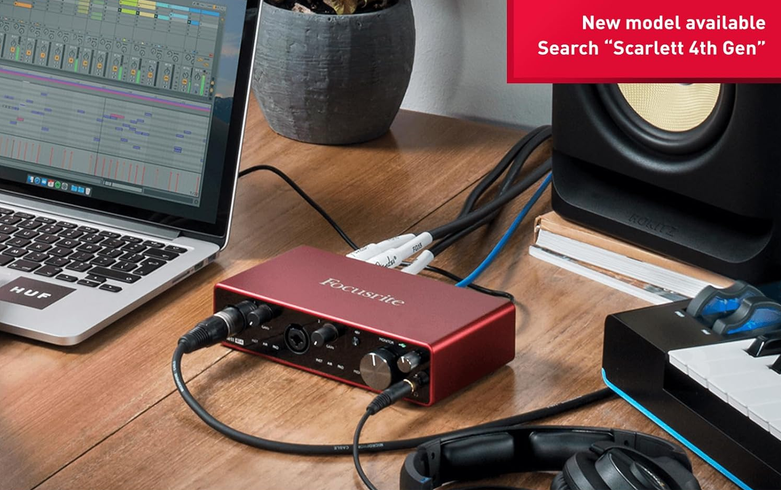
Focusrite Scarlett 4i4 3rd Gen Review
Is the Focusrite Scarlett 4i4 3rd Gen Good?
The Scarlett 4i4 3rd Gen was the bedrock of intermediate home setups for years. It combines two mic preamps, two line inputs, four line outputs, and classic 5-pin MIDI I/O in a sturdy red aluminum enclosure. It remains a capable piece of hardware if you buy it used or at a clearance discount, but its age shows when compared to current-generation standards.
What I Like
- Solid Aluminum Housing: The brushed red metal body easily withstands accidental bumps on a crowded desk.
- Flexible 4×4 Routing: Having extra rear line inputs allowed me to leave external synth modules permanently patched in.
- Integrated MIDI Ports: 5-pin MIDI In/Out saved me from needing a separate USB-MIDI converter box.
- Tactile Gain Halos: Color-coded halo rings around the gain knobs make identifying signal levels intuitive.
- Analogue Air Mode: Adds a pleasant high-end shelf that brightens up dark vocal mics instantly.
- Reliable Driver Stability: Low latency performance across macOS and Windows with zero unexpected driver crashes during long sessions.
What Could Be Better
- Limited Preamp Gain: With only 56 dB on tap, dynamic microphones like the Shure SM7B require an inline gain booster.
- Headphone Power Struggles: Drives high-impedance headphones poorly, forcing you to crank the headphone knob near 90% volume.
- Cluttered Front Cables: Front-facing combo XLR jacks leave thick microphone cables draped across the front desk area.
- Older Focusrite Control App: Setting up internal loopback sub-mixes in Focusrite Control 1 feels clunky.
Pros & Cons Table
| Pros | Cons |
| Durable brushed aluminum chassis | 56 dB gain range struggles with quiet dynamic mics |
| Reliable low-latency ASIO drivers | Headphone output lacks power for 300-ohm headphones |
| Hardware 5-pin MIDI I/O included | Front XLR inputs cause desk cable clutter |
| Analogue Air presence boost | Older Focusrite Control 1 interface feels dated |
Personal Recommendation
The Scarlett 4i4 3rd Gen remains a functional desktop interface if you snag it secondhand at a low cost. However, if you record quiet acoustic sources or use gain-hungry dynamic mics, its limited preamp headroom will test your patience.
Rating: 4.1 / 5
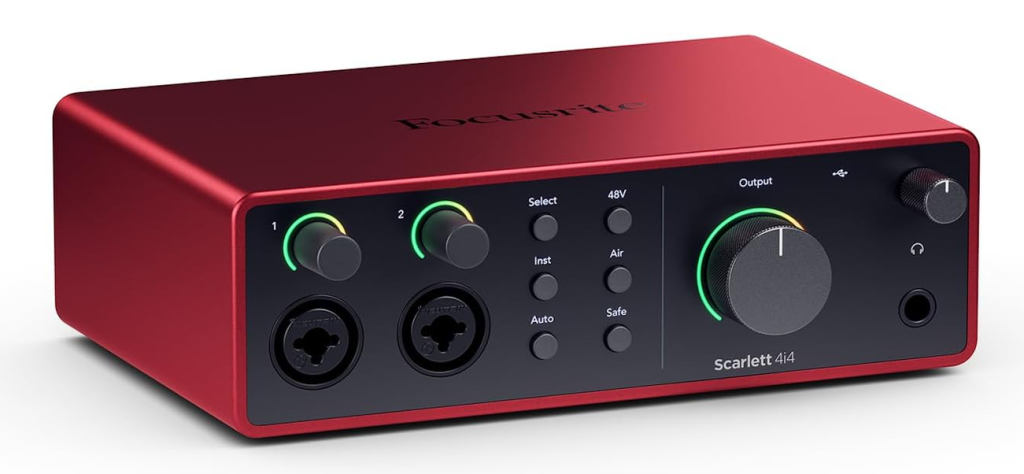
Focusrite Scarlett 4i4 4th Gen Review
Is the Focusrite Scarlett 4i4 4th Gen Good?
The Focusrite Scarlett 4i4 4th Gen isn’t just an incremental refresh; it represents a fundamental overhaul. Focusrite borrowed the A/D converters from their professional RedNet studio line, re-engineered the preamps to deliver 69 dB of gain, and introduced intelligent input protection tools.
What I Like
- Preamps with 69 dB Gain: Clean gain headroom allows direct recording with low-output dynamic mics without introducing unwanted hiss.
- RedNet A/D Conversion: Unlocks 120 dB of dynamic range, delivering superior clarity and spatial separation in recordings.
- Auto Gain Calibration: Pressing the Auto button sets perfect recording levels in 10 seconds flat.
- Clip Safe Protection: Actively monitors input levels and adjusts gain automatically to prevent ruined takes.
- Dual-Mode Air Circuit: Choose between classic Presence boost and rich analogue Harmonic Drive.
- Reworked Back-Panel Layout: Mic XLR inputs moved to the back keep microphone cables tucked away cleanly.
- Beefier Headphone Amp: Drives 300-ohm reference monitors with punchy bass and clean output headroom.
- Focusrite Control 2 App: Sleek control software that includes an intuitive mobile remote control app for iOS and Android.
What Could Be Better
- Higher Price Tag: Markedly more expensive than leftover 3rd Gen models.
- Higher Power Consumption: Requires a 1.5A USB-C connection or the included power supply on older hosts.
- Still Only One Headphone Jack: A 4-input interface at this price tier would benefit from dual independent headphone outs.
- No Front-Panel XLR: Plugging a microphone in quickly requires reaching around to the back panel.
Pros & Cons Table
| Pros | Cons |
| 69 dB gain eliminates external mic boosters | Higher price tag compared to previous generation |
| 120 dB dynamic range with RedNet converters | Only single headphone output on a 4×4 interface |
| Auto Gain and Clip Safe keep takes distortion-free | Requires 1.5A USB power port or external power brick |
| Dual Air mode adds harmonic warmth | Reaching behind for XLR inputs can be awkward on narrow desks |
Personal Recommendation
The Scarlett 4i4 4th Gen sets the modern standard for compact USB-C desktop interfaces. The combination of RedNet audio clarity, high-gain preamps, and intelligent input safeguards makes it worth every extra dollar over its predecessor.
Rating: 4.8 / 5
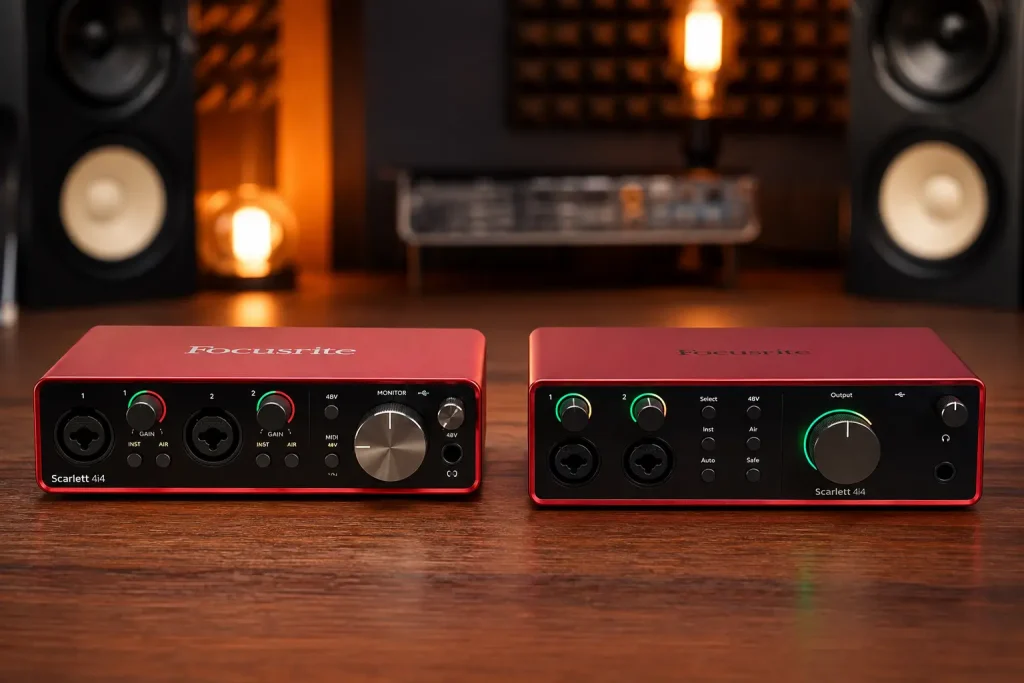
Head-to-Head Comparison
Sound Quality & A/D Conversion
Audio converters dictate how accurately your analogue signals convert to digital bits inside your DAW. The 3rd Gen model performs reliably with a 111 dB dynamic range. It sounds balanced, clean, and transparent enough for home demo production.
However, the 4th Gen makes a tangible jump by incorporating flagship RedNet converters. The dynamic range jumps to 120 dB, resulting in noticeably lower noise floors and cleaner resolution of soft audio details. During vocal tests, reverb tails decayed smoothly into total silence without digital hash.
My Take
The extra 9 dB of dynamic range on the 4th Gen provides an audible difference in transparency, giving acoustic instruments a wider 3D soundstage.
- 3rd Gen Rating: 8.2/10
- 4th Gen Rating: 9.6/10
- Winner: 4th Gen
Preamp Performance & Noise Floor
The 3rd Gen preamps offer 56 dB of gain range. When tracking with condenser mics or high-output instruments, this works fine. But when I plugged in a Shure SM7B dynamic microphone, I had to crank the gain knob past 90%, introducing noticeable background hiss.
The 4th Gen re-engineered preamps offer a massive 69 dB gain range. I was able to record speech on the SM7B with the gain set comfortably at around 65% with absolute quiet in the background. An EIN rating of -127 dBu ensures quiet recordings even when capturing faint acoustic sources.
My Take
The 4th Gen eliminates the need to spend an extra $100 on an external inline gain booster like a Cloudlifter.
- 3rd Gen Rating: 7.5/10
- 4th Gen Rating: 9.5/10
- Winner: 4th Gen
Air Mode & Tone Shaping
On the Scarlett 3rd Gen, turning on Air Mode engages an analogue filter that boosts high frequencies, adding a crisp presence to vocals and acoustic guitars. It is a simple binary toggle that works well, though it can sound slightly harsh on bright condenser mics.
The 4th Gen expands this into a dual-stage circuit. You get the classic Presence mode, plus a new Harmonic Drive mode. Harmonic Drive adds subtle harmonic distortion to the midrange, giving vocals, electric bass, and synth patches an analog console warmth that cuts through a dense mix without sounding brittle.
My Take
Harmonic Drive mode on the 4th Gen adds genuine analog character rather than just a simple treble EQ boost.
- 3rd Gen Rating: 8.0/10
- 4th Gen Rating: 9.3/10
- Winner: 4th Gen
Smart Features (Auto Gain & Clip Safe)
The 3rd Gen interface relies entirely on your manual monitoring. You speak or play into the mic, watch the gain halo light up green or red, and adjust the physical knob manually.
The 4th Gen introduces Auto Gain and Clip Safe. Pressing the Auto button triggers a 10-second soundcheck where the interface automatically calculates optimum gain levels. Meanwhile, Clip Safe acts like an automatic engineer, scanning input levels up to 96,000 times a second and dialing back gain mid-recording if a vocalist suddenly belts out loud notes.
My Take
For solo artists who engineer their own takes, Auto Gain and Clip Safe remove level-setting anxiety entirely.
- 3rd Gen Rating: 6.5/10
- 4th Gen Rating: 9.8/10
- Winner: 4th Gen
Headphone Amplifier & Monitoring
The headphone output on the 3rd Gen delivers 108 dB of dynamic range. It handles typical 32-ohm studio headphones like the Audio-Technica ATH-M50x comfortably. However, when I plugged in 300-ohm Sennheiser HD600 headphones, the volume level was borderline quiet even at full output.
The 4th Gen updates the headphone amp circuit with 115 dB of dynamic range and significantly more voltage swing. The HD600s came alive with full bass extension, dynamic transients, and plenty of headroom left on the volume knob.
My Take
If you mix on high-impedance open-back headphones, the 4th Gen provides a dramatically better monitoring experience.
- 3rd Gen Rating: 7.0/10
- 4th Gen Rating: 9.2/10
- Winner: 4th Gen
Hardware Build & Desktop Cable Management
The 3rd Gen unit places two combo XLR inputs right on the front faceplate alongside two gain knobs, phantom power buttons, and monitor knobs. While convenient for plugging in quickly, heavy XLR cables create a cluttered web across your desktop.
The 4th Gen moves the primary XLR mic inputs to the rear panel, keeping instrument 1/4″ jacks on the front. The front panel now features smooth-feeling endless rotary encoders surrounded by dynamic LED gain halos.
My Take
Moving mic inputs to the rear creates a cleaner, more organized studio desk setup.
- 3rd Gen Rating: 8.0/10
- 4th Gen Rating: 9.0/10
- Winner: 4th Gen
Software Integration & Routing
Both generations rely on custom software to configure sample rates, hardware direct monitoring, and internal Loopback routing. The 3rd Gen uses Focusrite Control 1, which works fine but features a multi-tabbed layout that can confuse new users.
The 4th Gen uses Focusrite Control 2. The UI is streamlined, response time is faster, and it includes mobile app compatibility. You can control gain levels, turn on 48V phantom power, or adjust headphone mixes directly from an iPad or smartphone while standing across the room in a vocal booth.
My Take
The mobile remote capabilities of Focusrite Control 2 make solo recording tasks effortless.
- 3rd Gen Rating: 7.8/10
- 4th Gen Rating: 9.4/10
- Winner: 4th Gen
Value for Money
Price is where the 3rd Gen retains an advantage. Because it has been superseded, leftover stock and used market units can be found at steep discounts. If you only record line-level instruments (like digital keyboards) where ultra-high preamp gain isn’t required, a discounted 3rd Gen delivers great utility per dollar.
However, when factoring in that the 4th Gen eliminates the need for an external mic booster ($100 saved) and includes higher-grade converters, its higher launch price represents excellent long-term value.
My Take
The 3rd Gen wins on immediate upfront cost, but the 4th Gen is the smarter long-term investment.
- 3rd Gen Rating: 8.8/10
- 4th Gen Rating: 8.5/10
- Winner: 3rd Gen
Buyer-Specific Recommendations
Best for Home Studios: Focusrite Scarlett 4i4 4th Gen
The pristine 120 dB RedNet converters and flexible line output routing (for connecting multiple studio monitor pairs or outboard analog gear) make the 4th Gen a center-piece interface for home mixing.
Best for Podcasters & Streamers: Focusrite Scarlett 4i4 4th Gen
Auto Gain and Clip Safe ensure broadcast levels remain consistent without clipping during loud conversations. Built-in Loopback channels make capturing Discord callers or game audio effortless.
Best for Synth & Hardware Creators: Tie
Both generations offer two front inputs and two dedicated rear line inputs, alongside standard 5-pin MIDI I/O. If you only plug in line-level synths, the 3rd Gen performs nearly as well as the 4th Gen.
Best for Gain-Heavy Mics (Shure SM7B): Focusrite Scarlett 4i4 4th Gen
With 69 dB of low-noise preamp gain, the 4th Gen powers low-output dynamic mics cleanly without needing an external gain lifter.
Best Value on a Budget: Focusrite Scarlett 4i4 3rd Gen
If you are buying on a strict budget, purchasing a used 3rd Gen unit delivers basic 4×4 recording capabilities for less money.
Alternatives Worth Considering
1. MOTU M4
- Why Choose It: Features full-color LCD level meters on the front panel that show precise input/output dB values.
- Tradeoff: Lacks smart auto-gain features and has slightly less preamp gain (60 dB vs 69 dB).
2. Audient iD14 MKII
- Why Choose It: Outstanding class-A console preamps and expandable ADAT optical input for adding up to 8 extra channels.
- Tradeoff: No built-in 5-pin MIDI hardware ports.
3. Universal Audio Volt 476
- Why Choose It: Built-in hardware 1176-style analog compressor circuits for instant tone shaping on tracking.
- Tradeoff: Bulkier physical footprint and lacks auto-gain input protection.
4. Solid State Logic SSL2+
- Why Choose It: Legacy 4K switch adds analogue saturation and top-end punch modeled after SSL 4000 series consoles.
- Tradeoff: Lacks flexible software routing control software compared to Focusrite Control 2.
Who Should Buy Which?
Buy the Focusrite Scarlett 4i4 3rd Gen If:
- You are buying on a strict budget and found a clearance or used deal.
- You exclusively record line-level instruments like hardware keyboards, drum machines, and grooveboxes.
- You already own an external inline preamp booster (Cloudlifter or FetHead) for your dynamic microphones.
- You do not care about auto-gain automation or remote smartphone software control.
Buy the Focusrite Scarlett 4i4 4th Gen If:
- You use gain-hungry dynamic mics like the Shure SM7B or Electro-Voice RE20.
- You want professional RedNet studio conversion for detailed mixing decisions.
- You want Auto Gain and Clip Safe to keep recordings distortion-free automatically.
- You use high-impedance headphones (250+ ohms) and need clean headphone output volume.
- You want a tidy desk setup with mic cables routed to the back of the interface.
Comparison Summary Table
| Evaluation Parameter | Scarlett 4i4 3rd Gen Score | Scarlett 4i4 4th Gen Score | Category Winner |
| A/D & D/A Clarity | 8.2 / 10 | 9.6 / 10 | 4th Gen |
| Preamp Gain & Noise | 7.5 / 10 | 9.5 / 10 | 4th Gen |
| Input Safeguards | 6.0 / 10 | 9.8 / 10 | 4th Gen |
| Air Mode Tonal Options | 8.0 / 10 | 9.3 / 10 | 4th Gen |
| Headphone Amp Output | 7.0 / 10 | 9.2 / 10 | 4th Gen |
| Cable Management | 8.0 / 10 | 9.0 / 10 | 4th Gen |
| Software & Routing | 7.8 / 10 | 9.4 / 10 | 4th Gen |
| Price & Immediate Value | 8.8 / 10 | 8.5 / 10 | 3rd Gen |
| Overall Score | 7.7 / 10 | 9.3 / 10 | Focusrite Scarlett 4i4 4th Gen |
2026 Check: The 4th Gen Wins on Features - the 3rd Gen Wins on Price
Auto Gain and Clip Safe are the 4th Gen’s real case. The head-to-head section in this article names them as smart features, and they matter most to exactly the buyers who struggle with gain staging: beginners, streamers, and anyone recording gain-hungry microphones like the SM7B. If you have ever clipped a take or fought a gain knob, those two features are worth real money - and they do not exist on the 3rd Gen.
Gain-hungry mics tip the decision. The article’s own buyer recommendations already say it: for gain-heavy mics, the 4th Gen is the pick, thanks to its stronger preamps and lower noise floor. If your microphone is an SM7B or similar, the generation gap is not cosmetic - it is the difference between a clean signal and a noisy one. Our Scarlett 4i4 3rd Gen review covers what the older unit still does well.
Budget is the 3rd Gen’s entire argument - and it is a good one. For straightforward recording with normal microphones, the 3rd Gen does the same job for less, and a used one plus a better microphone beats a new 4th Gen with a cheap mic every time. The article’s own best-value recommendation says the same. Buy the 4th Gen for the features; buy the 3rd Gen for the price; do not buy the 4th Gen merely because it is newer. For the smaller sibling, see our Scarlett 2i2 4th Gen review.
Expert Verdict
The Focusrite Scarlett 4i4 4th Gen represents a significant step forward over the 3rd Gen. Focusrite did not just polish the shell; they updated the core architecture with RedNet-derived A/D converters, 69 dB ultra-low-noise preamps, and intelligent input protection.
If you already own a 3rd Gen and only track line-level synths, upgrading might not feel urgent. But if you record vocals, spoken word, or acoustic instruments, the 4th Gen eliminates the need for external inline mic boosters, protects your takes from digital clipping, and provides cleaner headphone monitoring. The 4th Gen is easily the superior audio interface and worth the investment for any modern studio desk.
Full Technical Specifications Table
| Feature Spec | Focusrite Scarlett 4i4 3rd Gen | Focusrite Scarlett 4i4 4th Gen |
| Analogue Inputs | 2 Combo XLR/Line, 2 Fixed Line Ins | 2 XLR Mic Ins, 2 Line/Inst Ins, 2 Fixed Line Ins |
| Analogue Outputs | 4 Line Outputs (1/4″ TRS Balanced) | 4 Line Outputs (1/4″ TRS Balanced) |
| Headphone Outputs | 1 x 1/4″ TRS Jack | 1 x 1/4″ TRS Jack (Upgraded Circuit) |
| A/D Dynamic Range | 111 dB | 120 dB |
| D/A Dynamic Range | 108 dB | 130 dB |
| Max Preamp Gain | 56 dB | 69 dB |
| Microphone EIN | -128 dBu | -127 dBu |
| Supported Sample Rates | 44.1kHz to 192kHz | 44.1kHz to 192kHz |
| Air Mode Functions | High-Frequency Presence Boost | Presence Boost + Harmonic Drive |
| Automated Levels | No | Auto Gain & Clip Safe Modes |
| Digital I/O | Loopback Audio | Loopback Audio |
| MIDI Connectivity | 5-Pin DIN In and Out | 5-Pin DIN In and Out |
| USB Protocol | USB 2.0 over USB-C | USB 2.0 over USB-C |
| Power Supply | USB Bus Powered | USB Bus Powered (5V 1.5A) / External Power |
| Control Software | Focusrite Control 1 | Focusrite Control 2 (Desktop & Mobile App) |
Frequently Asked Questions
Is the Focusrite Scarlett 4i4 4th Gen worth upgrading from the 3rd Gen?
Yes, for most recording workflows. Upgrading gives you 69 dB of gain (eliminating external mic boosters), 120 dB RedNet converters for cleaner audio, Auto Gain, Clip Safe, and a stronger headphone output.
Does the Focusrite Scarlett 4i4 4th Gen need a Cloudlifter for the Shure SM7B?
No. The 4th Gen preamps feature 69 dB of gain range, which provides plenty of clean headroom to drive low-output dynamic microphones like the Shure SM7B directly.
What do Auto Gain and Clip Safe do on the Scarlett 4th Gen?
Auto Gain listens to your signal for 10 seconds and automatically sets optimal recording levels. Clip Safe monitors input levels constantly and lowers gain automatically if your signal gets loud enough to clip.
Can I drive 250-ohm or 300-ohm headphones on the Scarlett 4i4 4th Gen?
Yes. Focusrite redesigned the headphone amplifier on the 4th Gen interface with higher voltage output and 115 dB dynamic range, driving 300-ohm headphones like the Sennheiser HD600 easily.
Why did Focusrite move the XLR inputs to the back panel on the 4th Gen 4i4?
Moving mic XLR inputs to the rear panel eliminates cable clutter across your desk. Hi-Z instrument jacks remain on the front panel for quick access when plugging in guitars.
What is the difference between 3rd Gen and 4th Gen Air Mode?
The 3rd Gen Air Mode offers a single presence boost in high frequencies. The 4th Gen features dual modes: Presence boost and an all-new Harmonic Drive mode that adds analogue mid-range warmth.
Does the Focusrite Scarlett 4i4 support internal Loopback for streaming?
Yes, both 3rd Gen and 4th Gen support Loopback audio channels. This allows you to route desktop audio (like YouTube, Zoom, or games) directly into your DAW or streaming software like OBS.
Can the Scarlett 4i4 4th Gen run on USB bus power alone?
Yes, provided your computer’s USB-C port supplies at least 5V at 1.5A. For older USB ports that deliver less power, Focusrite includes an external power supply in the box.
What software is bundled with the Focusrite Scarlett 4i4 4th Gen?
The 4th Gen comes with Ableton Live Lite, Pro Tools Intro, Cubase LE, and the Hitmaker Expansion software bundle (which includes plugins from Softube, XLN Audio, Antares, and Native Instruments).
Does the Focusrite Scarlett 4i4 have MIDI ports?
Yes, both the 3rd Gen and 4th Gen Scarlett 4i4 feature dedicated 5-pin DIN MIDI In and Out ports on the rear panel for connecting hardware synths and controllers.
Related reading: Focusrite Scarlett 4i4 3rd Gen Problems